Wildfly 기본정보
개요
- wildfly가 tomcat을 대체할 수 있는지 기술검토
Wildfly 이해
- Redhat이 2006sus Jboss inc 인수
- Java EE(Enterprise Edition)을 모두 지원
- 상용 솔루션으로는 JBoessEAP가 있고, Wildfly (구 JBoss AS)는 커뮤니티 성 솔루션
-
java EE 의 전체 Stack은 다음 Diagram으로 대체
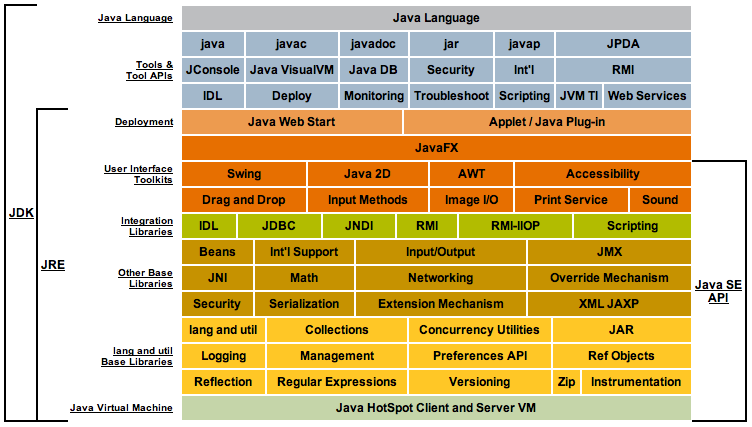
-
Wildfly와 Tomcat의 stack 비교
| 항 목 | Wildfly | Tomcat |
|---|---|---|
| 제공기능 | Application Server (Tomcat 내장) | Servlet Container (web server) |
| 메모리 사용량 | Tomcat대비 많음(2~300M) | 상대적으로 적음 (6~70M) |
| DB Connection | 내장 | 없음(별도 라이브러리 사용필요) |
| 장/단점 | JAVA EE를 포함하고 있기 때문에 다양한 기능 제공 | |
| 메모리 점유율이 높음 | J2EE전체 기능이 필요없는 경우 사용 | |
| 상대적으로 가볍게 작동함 | ||
| Link | https://www.wildfly.org/downloads/ | https://tomcat.apache.org/ |
- 구동모드 설정
| 구동모드 | 상세설명 |
|---|---|
| standalone | 단일 인스턴스로 실행 |
| 인스턴스단위로 프로파일 및 설정파일이 개별적으로 작동 | |
| domain | 도메인 컨트롤러 포함 |
| 다수 인스턴스가 그룹으로 구성, 인스턴스별 그룹지정이 가능하고, 그릅단위로 설정 |
- Wildfly 프로파일 설명
| 프로파일명 | 설정파일 | 제공기능 |
|---|---|---|
| default | standalone | infinispan, ee, ejb3 |
| ha | standalone-ha | jgroup, modcluster, infinispan, ee, ejb3 |
| full | standalone-full | jacorb, messagging, webservice, infinispan, ee, ejb3 |
| full-ha | standalone-full-ha | jacorb, messagging, webservice, jgroup, modcluster, infinispan, ee, ejb3 |
- 디렉토리 구조
| 디렉토리 | 설명 |
|---|---|
| appclient | 클라이언트용 홈디렉토리 |
| bin | 스크립트 파일 |
| docs | xml / 설정파일 |
| docs/examples/configs | 예시 구성파일 |
| domain | domain 홈디렉토리 |
| modules | 추가 모듈 디렉토리 |
| standalone | standalone 모드 홈 디렉토리 |
| standalone/configuration | standalone 모드 설정파일 |
| standalone/data | standalone 모드 생성파일 |
| standalone/deployments | app배포 |
| standalone/lib/ | JAVA EE / SE 라이브러리 |
| standalone/log | 로그파일 저장소 |
| standalone/tmp | 임시파일 저장소 |
| welcome-content | 첫 페이지 경로 |
Wildfly 설치
-
java (1.8이상 설치 필요)
$> yum install java-1.8.0 -y ... $> which java /usr/bin/java $> /usr/bin/java -version openjdk version "1.8.0_292" OpenJDK Runtime Environment (build 1.8.0_292-b10) OpenJDK 64-Bit Server VM (build 25.292-b10, mixed mode) -
바이너리 다운로드 후 압축해제
$> wget https://download.jboss.org/wildfly/24.0.0.Final/wildfly-24.0.0.Final.tar.gz $> tar -zxvf wildfly-24.0.0.Final.tar.gz -C /usr/local/ $> ln -s /usr/local/wildfly-24.0.0.Final/ /usr/local/wildfly - 외부 접속 허용하기
$> vi /usr/local/wildfly-24.0.0.Final/standalone/configuration/standalone.xml ... <interface name="public"> <inet-address value="${jboss.bind.address:0.0.0.0}"></inet-address> </interface> ... -
management user 생성
$> ./add-user.sh What type of user do you wish to add? a) Management User (mgmt-users.properties) b) Application User (application-users.properties) (a): a Enter the details of the new user to add. Using realm 'ManagementRealm' as discovered from the existing property files. Username : {{ 계정명 }} Password recommendations are listed below. To modify these restrictions edit the add-user.properties configuration file. - The password should be different from the username - The password should not be one of the following restricted values {root, admin, administrator} - The password should contain at least 8 characters, 1 alphabetic character(s), 1 digit(s), 1 non-alphanumeric symbol(s) Password : {{ 계정 패스워드 }} Re-enter Password : {{ 계정 패스워드 }} What groups do you want this user to belong to? (Please enter a comma separated list, or leave blank for none)[ ]: About to add user '{{ 계정명 }}' for realm 'ManagementRealm' Is this correct yes/no? yes Added user '{{ 계정명 }}' to file '/usr/local/wildfly-24.0.0.Final/standalone/configuration/mgmt-users.properties' Added user '{{ 계정명 }}' to file '/usr/local/wildfly-24.0.0.Final/domain/configuration/mgmt-users.properties' Added user '{{ 계정명 }}' with groups to file '/usr/local/wildfly-24.0.0.Final/standalone/configuration/mgmt-groups.properties' Added user '{{ 계정명 }}' with groups to file '/usr/local/wildfly-24.0.0.Final/domain/configuration/mgmt-groups.properties' Is this new user going to be used for one AS process to connect to another AS process? e.g. for a slave host controller connecting to the master or for a Remoting connection for server to server Jakarta Enterprise Beans calls. yes/no? yes To represent the user add the following to the server-identities definition <secret value="Y3MxMjMhQCM=" ></secret> -
실행하기
$> ./bin/standardalone.sh & - 접속하기
- 브라우져 로그인 : http://{{ 서버IP }}:8080/
- 관리자 콘솔 로그인 : http://{{ 서버IP }}:9990/console/index.html (로그인 계정은 4. management user 생성 참고)
자체결론
- tomcat은 경량화된 컨테이너형태로 제공되고, wildfly는 보다 더 넓은 기능이 포함되어 있기 때문에 전환은 가능.
- 다만 엔터프라이즈 기능이 포함되어 있기 때문에 tomcat보다는 좀 더 무거워보임